
Welcome to Microsoft Access Database Tutorial

Saturday, May 25, 2013

Welcome to the Access Database Tutorial website that will show you how to use Microsoft Access Database by learning and managing this powerful application using the most effective techniques and tools available for visitors with very little or no knowledge to get you up and running without the need to learn all the ‘geek’ speak keeping it Jargon free that most trainers and consultants like to impress you with!

If you are new to Access or wish to know what it is, please take a look at

An Introduction To Microsoft Access.

Also, this website contains a blog, products on offer and free general tips to help users find out all about  latest news and articles I feel worth mentioning along with my recommendations of videos and books.

microsoft access courses onlineOnline Coaching?  

As a Thank You for Visiting…

Claim Your Free eBook NOW!

Enjoy and thank you for visiting!

Posted in MS Access | Tagged , | Comments Off

Is Access A Relational Database – It Is But There Are Other Models Too

Is Access A Relational Database – It Is But There Are Other Models Too

If you have been working with Microsoft Access for a while now, you should be building databases the correct and perceived way but Is Access a relational database?

You should be familiar with the term RDBMS which stands for Relational Database Management System and this is the true definition for MS Access (as defined by Wikipedia) emphasising on ‘database management system‘.

However, DBMS comes in many shapes and sizes depending on the database processes, workflows and the size of the organisation.

Is Access A Relational Database

Therefore, there are different types of DBMS’s and here are some for you to contemplate and evaluate which Continue reading

Posted in Database Theory, Microsoft Training, MS Access | Tagged , , , , | Leave a comment

MS Access Report Design Tip: How To Hide Duplicates (Selectively) In Your Access Reports

MS Access Report Design Tip: How To Hide Duplicates (Selectively) In Your Access Reports

One of the many tips within the access database design vault are normally hidden secrets of unknown properties. For your Access report design collection of properties, you may have noticed a wealth of useful attributes to choose and one in particular I want to highlight is the ‘Hide Duplicates‘ property for reports.

However, this property is not perfect as I will explain in a moment. Instead, you may want to use another hidden property (outside of the Access VBA library) that can actually be applied directly to your Access report designs. The property in question is called ‘IsVisible‘!

access report design

From the illustration above, I’m showing three different instances of the same report. The first is a normal typical list report of customers, the order date, order number and products for each order. The second instance  Continue reading

Posted in Microsoft Training, MS Access, Reports | Tagged , , , , | 5 Comments

MS Access Tools: How To Convert And Deploy An Access Database File As An Executable (ACCDE Or MDE)

MS Access Tools: How To Convert And Deploy An Access Database File As An Executable (ACCDE Or MDE)

Building your Access database for others who do not necessarily have the MS Access application or need to gain access to the design environment means wrapping and converting your file into an executable format (ACCDE or MDE). Using the MS Access tools available, this is just a start to a full deploy-able solution.

Take a look at this quick video (less than three minutes) showing first the process to convert your ACCDB/MDB file into an executable format and then introducing you to the free independent downloadable install script turning this into a polished application…

There are some Continue reading

Posted in MS Access, Utilities | Tagged , , , , | Leave a comment

Bar Code Font That Can Be Freely Used With Microsoft Access

Bar Code Font That Can Be Freely Used With Microsoft Access

Many Microsoft Access databases are designed to manage the products and order workflows of any production based or manufacturing business and with any delivery note or dispatch document using bar codes makes capturing data very easy.

However, your operating system (typically Microsoft Windows) will not have a default bar code font installed but with this free resource courtesy of BarcodesInc, you can now download and install the free fonts that is available across Windows and not just for MS Access.

bar code font for ms access

When you download and install this new font, you add Continue reading

Posted in Forms, MS Access, Reports, Utilities | Tagged , , , , | 1 Comment

Can A Foreign Key Be Null: Cascade to Null Relationships In Microsoft Access

Can A Foreign Key Be Null: Cascade to Null Relationships In Microsoft Access

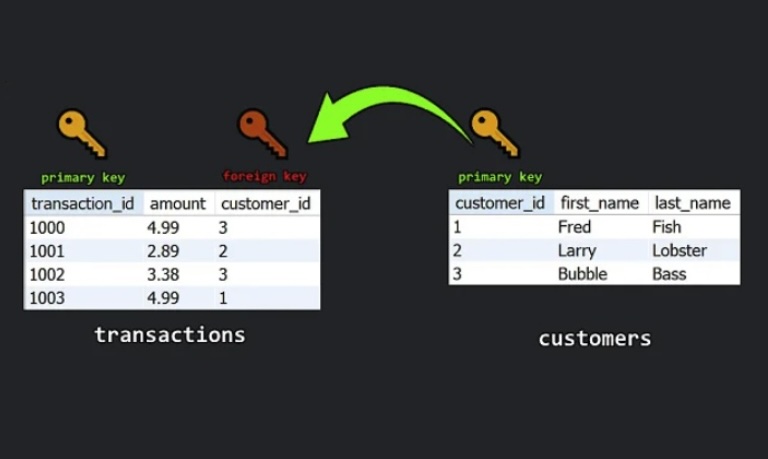
The first thing to note here when asking the question can a foreign key be Null? is to clarify what a foreign key is, what is meant by the value Null and something known as setting the ‘Enforce Referential Integrity‘ option for your joined tables.

can a foreign key be null

Simply put:

A Foreign Key is way to index a field which can accept duplicate values that are found from the ‘many‘ side of a ‘one-to-many‘ relationship and cannot be left blank.

A Null value is an unknown value or a data entry which has no value to it which can happen with your text and date/time data types. When Continue reading

Posted in Database Theory, Microsoft Training, MS Access, Tables | Tagged , , , , | 4 Comments

Microsoft Access Reports: How To Number Entries In A Report

Microsoft Access Reports: How To Number Entries In A Report

If you need to know how to number records for your Microsoft Access reports and haven’t added a sequential data field namely the AutoNumber (which should be a primary key), then here’s a quick way to add such a feature directly into your reports.

microsoft access reports

Design your report using one of the various Continue reading

Posted in Microsoft Training, MS Access, Reports | Tagged , , , , | Leave a comment

MS Access Multiple Values For A Single Field: A New Data Option From Version 2007

MS Access Multiple Values For A Single Field: A New Data Option From Version 2007

With traditional Access databases, storing data values in a field were very ‘single-minded’! However with the introduction of version 2007, Access multiple values can be achieved into one field using the new element called ‘Allow Multiple Values‘ which is a new option available when using the Lookup Wizard feature to create either a drop-down Combo box or List box.

For the ‘purist’ database developer, you do not even need to use the wizard tool as there are new properties available via the ‘Lookup‘ tab for each field in your table design view.

access multiple values

Before I step you through the very basics of creating a multiple value input field, one needs to Continue reading

Posted in Database Theory, MS Access, Tables | Tagged , , , , | Leave a comment

Password For Access Database: How To Set Database Passwords Using The Simple Encrypt Feature

Password For Access Database: How To Set Database Passwords Using The Simple Encrypt Feature

Setting a password for Access database applications is a simple and straight forward affair and now as a standard way to apply such protection, Microsoft Access (from version 2007) provides the basic password encrypted feature which means a better secure way to stop unauthorised users opening your database file.

Take a quick look at this video tutorial stepping your through how to apply the encryption password method.

In this video, it covered the very essentials of setting a password and you may have noticed that each time you wanted to add, edit or even remove a password (applying decryption) you first had Continue reading

Posted in Microsoft Training, MS Access, Utilities | Tagged , , , , | 2 Comments

MS Access Queries: How To Add An Ad-Hoc Linked Table To Your Query

MS Access Queries: How To Add An Ad-Hoc Linked Table To Your Query

How well do you know MS Access queries? Here’s another way you can communicate with a table that does not reside within the same database without the need to officially link a table using either the Linked table manager tool or via the Linked table method.

Some have said this is Microsoft Access queries on steroids! I think MS Access database is generally on steroids in any event especially when users want to know the difference between this powerful application and the more commonly used Microsoft Excel.ms access queries

It is very easy to Continue reading

Posted in MS Access, Queries, Tables | Tagged , , , , | 1 Comment